Friday, October 31, 2008

Beyond Auditing

Sometimes capturing the fact that someone changed something and who that someone is, isn't enough. Sometimes, if the values in a row of a table were changed, you need to know what the original values were along with who changed them. Into this space we introduce SQL Server 2008 Change Data Capture (CDC).
This new feature of SQL Server records Data Modification Language operations (INSERT, UPDATE, DELETE) on user tables. The changes are exposed using table-valued functions. The CDC asynchronously reads changes in the source tables from the transaction log and inserts those changes into separate change tables. This feature is available in Enterprise, Developer, and Evaluation editions only.

CDC Diagram

Before we can use this feature we have to configure the database for it. A member of the sysadmin server role must enable CDC on the database by running the sys.sp_cdc_enable_db stored procedure. You can also enable CDC for individual tables only by running sys.sp_cdc_enable_db_change_data_capture.

--First, let's create a demonstration database with a table in it
USE [master];
GO
IF NOT EXISTS (SELECT name FROM sys.databases WHERE name = N'DemoDB')
    CREATE DATABASE [MyDB];
GO
USE [MyDB];
GO
CREATE TABLE MyTable
(MyID INT PRIMARY KEY NOT NULL,
 MyItem VARCHAR(128),
 MyQty INT);
 GO
 
--Next, let's enable CDC on the database
EXEC sys.sp_cdc_enable_db;
GO
--Enable CDC for the Products tableEXEC sys.sp_cdc_enable_table
@source_schema = N'dbo',
@source_name   = N'MyTable',
@role_name     = NULL,
@capture_instance = N'MyTbl_1',
@captured_column_list = N'MyID, MyItem, MyQty',
@filegroup_name = N'PRIMARY',
@supports_net_changes = 1
GO


When you run the two system stored procedures you will see results like these;

Job 'cdc.MyDB_capture' started successfully.
Job 'cdc.MyDB_cleanup' started successfully.

Notice that two jobs are created to monitor/capture and to cleanup the data capture tables.
Now, we have our table, let's put some data into it and modify that data so we can see CDC in action.

--Now let's add some initial data INSERT INTO MyTable(MyID,MyItem,MyQty) Values(1,'Item 1',20),(2,'Item 2',10),(3,'Item 3',1),(4,'Item 4',3); GO--And change it

UPDATE MyTable SET MyQty+=10 WHERE MyID=1; GO Command(s) completed successfully.


Now, when we enabled CDC for the database and the table in it, SQL Server created a pair of Table Valued Functions for us. The functions are named as cdc.fn_get_all_changes_'capture_instance', where 'capture_instance' is the value we specified for @capture_instance in our sp call to enable cdc on the table. In our case they are cdc.fn_cdc_get_all_changes_MyTbl_1. There are also several built-in functions for CDC that make querying information about CDC tables and instances easier. (See BOL for details). We will use two of the built-in functions in our example below.
Here they are in action;
DECLARE @from_lsn binary(10), @to_lsn binary(10);
SELECT @from_lsn = sys.fn_cdc_get_min_lsn(N'MyTbl_1');
SELECT @to_lsn = sys.fn_cdc_get_max_lsn();
SELECT * FROM cdc.fn_cdc_get_all_changes_MyTbl_1(@from_lsn,@to_lsn,N'all');
SELECT * FROM cdc.fn_cdc_get_net_changes_MyTbl_1(@from_lsn,@to_lsn,N'all');
GO

And the results from the above query;
 image
Notice the difference in the results from the two functions. The first function tracks history for every row in the table. It shows Item 1 as it was insert and again after it's update. The second function however, doesn't show the history, but just the net changes. Notice that the initial insert value for Item 1 is missing, only the current value is shown.

To read more on this topic check out the section in SQL Server 2008 Books Online. See all the available system functions associated with it. BOL topic is Change Data Capture.

Until next time, happy slinging.

Thursday, July 31, 2008

Productivity enhancements for SSMS

SQL Server 2008 includes several enhancements geared toward improving productivity and customer satisfaction. Some of the enhancements have been long sought after by the SQL Server database developer and administrator.

IntelliSense!
Yes we have long awaited the ability to write T-SQL code with IntelliSense helping code faster. IntelliSense with SQL 08 provides word completion and displays parameter information for functions and stored procs. In the XML editor, IntelliSense can completely show an element declaration. It also indicates errors with red squiggly lines and references them in the Error List window, so you can quickly navigate to the error line by double-clicking the entry. IntelliSense is provided in the Query editor as well as the XML editor, and supports most, but not all, T-SQL syntax. Below are some screen-shots of IntelliSense at work.

SQL08IntelliSenseMix

Collapsible Regions 
Similar functionality is now provided in the SMS08 Query Editor to regions delimited by BEGIN...END blocks and multi-line statements, such as SELECT statements that span two or more lines. This is similar to what Visual Studio has offered for a few releases now. Here's an example (note the '-' sign on the left, click to collapse text):

SQL08Regions

Delimiter Matching
Also similar to Visual Studio, SQL Server 2008 Management Studio now offers delimiter matching and highlighting. When you finish typing the second delimiter in a pair, the editor will highlight both the delimiters, or you can press CTRL + ] to jump to the matching delimiter when you are on one of them. This will help you keep track of parenthesis' and nested blocks. Automatic delimiting will recognize these delimiters;
(...), BEGIN...END, BEGIN...END TRY, BEGIN...END CATCH. Brackets and quotes are not recognized for delimiter highlighting.

SMS Object Explorer
More context menu choices have been provided for your right-click menu in Object Explorer. These choice include options for changing table design, to opening the table with a certain number of returning records, to getting some of the new reports available. Options for partitioning (Storage), Policies, and Indexing are provided as well.

SQL08SMS1

You will notice a new "Start PowerShell" option. Look for a future post to cover the new Windows PowerShell integration.

Integrated T-SQL Debugging
Debugging has now been integrated into the Query Editor! You can set breakpoints, step through code, step into code a particular location, and even set watches up to monitor variable values, locals and the call stack. Woohoo!!!!

Other improvements
Multi-Server queries, allow you to run a query across numerous servers and return the results with the server name prepended.
Launch SQL Profiler directly from Management Studio.
Customizable tabs
, allow you to modify the information shown and the layout from the tools\options dialog.
Object Explorer Detail Pane has been improved for better functionality and productivity with navigational improvements, detailed object information pane at the bottom, and integrated object search.
Object Search, allow you to search within a database on a full or partial string match and return objects to the Object Explorer Details pane.
Activity Monitor, you have to see it to appreciate it. Built brand new from scratch, it is based on the Windows Resource Monitor and allows you to see graphs of processor wait time, waiting processes, database I/O and batch requests. Detail grids are provided for Processes, Resource Waits, Data File I/O, and Recent Expensive Queries. It's a vast improvement for the DBA.
Performance Studio, new performance tuning tool that tracks historical performance metrics and stores them using drill-through reports.
Partitioning Setup GUI, at last a way to create and manage table partitions graphically. This is accessed from the context menu for a table under Storage. A wizard will launch allowing you to create or manage partitions.
Service Broker Hooks, new context menu items centralize access to the Service Broker T-SQL templates for messages, contracts, queues, etc. Read only property pages are provided for each of these objects as well.

The improvements in the toolset provided with SQL Server 2008 are vast and far sweeping. There are more for you to discover and the best way is to get your hands on it. You can download SQL Server Express 2008 from Microsoft if you don't have a developers edition license.

Please, as always, post your comments and questions. Until next time, happy slinging.

Wednesday, July 30, 2008

Auditing, Katmai Style

Ok, once again I've been unable to keep up with daily posts, so I've decided to stop fighting it. Since I'll most likely never be able to consistently post daily, I'm going to quit worrying about it and just focus on posting good content as I can.

In this installment though, let's explore the new Audit feature included in SQL Server 2008. SQL Server 2005 provided auditing via SQL Trace, C2 audit model, and DDL Triggers. While these methods are adequate they leave some room for improvement.

Into that gap steps the SQL Server Audit. This new feature is based on Extended Events and allows you to monitor server-level and database-level events, individually and in groups. The new SQL Server Audit object collects a single instances of the server or database-level actions and groups of actions to be monitored. The Audit object exists at the SQL Server instance level and you can have multiple audit objects per instances.

There are two specification objects can be included in an Audit object, the Server Audit Specification and the Database Audit Specification. You can only specify one server audit specification per audit, however you can have a database audit specification for each database in the instance. You can also only have a server audit specification or database audit specifications, not both.

As you can imagine a server audit specification collects information about the server, which are raised by the Extended Events feature. There are several predefined groups of actions, which are events exposed by the database engine, known as audit action groups. These can be included in your server audit specification object within the audit object.

The database audit specification collects what else but database-level audit actions, which are raised by the Extended Events feature. You can include either groups of actions or single actions to a database audit specification. Again, audit action groups are provided as predefined groups of actions.

So, we can collect all this audit information, now what? Well, obviously this feature wouldn't be complete without the ability to record the information somewhere. This is where the audit target comes into play. Each audit object sends the audit results to a target. That target can be a file, the Windows Security event log, or the Windows Application event log. Note that writing to the Windows Security event log requires elevated permissions, so in order for audit results to be logged there, the SQL Server service account will have to be granted the "Generate security audits" permission in the group or local policy.

The process of creating and using a SQL Server Audit is as follows;
1. Create a SQL Server Audit object
2. Create either a server audit specification or a database audit specification and map it to the audit object.
3. By default the Audit and Specification objects are disabled, so in this step enable them.
4. Auditing occurs and  you can read the data in the target you defined as part of the Audit object.

Let's see an example:

USE master GO --Create the audit object

CREATE SERVER AUDIT SrvAudit TO APPLICATION_LOG; GO --Create the audit specification object

CREATE SERVER AUDIT SPECIFICATION AuditSpec --and map it to the audit object

FOR SERVER AUDIT SrvAudit --then add the audit action group ADD (FAILED_LOGIN_GROUP); GO --Enable the audit ALTER SERVER AUDIT SrvAudit WITH (STATE = ON); GO


So looking at our Application log after attempting to log in with invalid credentials we see:
ApplicationLogKatmaiAuditExample

(Details)
AppLogKatmaiAuditDetailExample

For more information about auditing in SQL Server 2008 check out the SQL Server 2008 BOL, topic Auditing.

Next time we'll look into some of the IDE and configuration tool enhancements. Until then, keep slinging.

Tuesday, July 15, 2008

New Data Types

Well, I managed to miss yesterday, again, so I'm sorry. Luckily, it was only one day, so we aren't falling into a rut yet.

Today I'd like to look at the new data types available in SQL Server 2008. Specifically the new Date and Time, Filestream, and the spatial data storage types.

Date and Time
The new date/time types are a result of improvements that satisfy the requirements of separating date and time values, allowing a larger range or dates, allowing larger fractional second precision, providing Time zone awareness, providing ANSI SQL compliant or equivalent time and date data types, and to allow database migration compatibility with other database platforms.
The new types that allow these requirements to be met are:

DATE Stores only the date portion of a date/time and has a range of 0001-01-01 through 9999-12-31. It has a size of 3 bytes.
TIME(prec) Stores on the time portion of a date/time and has a range of 00:00:00.0000000 through 23:59:59.9999999, an accuracy of 100 nanoseconds (precision dependant). It has a size of 3 to 5 bytes dependant on precision.
DATETIMEOFFSET(prec) Stores a time zone aware, UTC preserved datetime, and has a range of 0001-01-01 00:00:00.0000000 through 9999-12-31 23:59:59.9999999 UTC. It has a size of 8 to 10 bytes, dependant on  precision
DATETIME2(prec) Stores datetime data, similar to datetime data type, but with a far larger range. Range is 0001-01-01 00:00:00.0000000 through 9999-12-31 59:59:59.9999999. This data type is not time zone aware and the size is 6 to 8 bytes dependant on precision.

Along with the new data types, new system functions are also provided:

SYSDATETIME() Returns the current database system timestamp as a datetime2(7) value.
SYSDATETIMEOFFSET() Returns the current database system timestamp as a datetimeoffset(7) value.
SYSUTCDATETIME() Returns the current database system timestamp as a datetime2(7) value, which represents the current UTC time.
SWITCHOFFSET(datetimeoffset, time_zone) Converts a datetimeoffset to a new time zone.
TODATETIMEOFFSET(datetime, time_zone) Converts a local datetime value to a datetimeoffset UTC value using the passed in time_zone value.

Let's look briefly at these new data types in action:
-- Show type usage
DECLARE @DateEx DATE;
DECLARE @TimeEx TIME;
DECLARE @DTOffEx DATETIMEOFFSET(7);
DECLARE @DT2Ex DATETIME2(7);
-- Put in some data
SET @DateEx = '2008-02-28 06:59:01.9489484';
SET @TimeEx = '2008-02-28 06:59:01.9489484';
-- View results
SELECT @DateEx AS [Date], @TimeEx AS [Time]
Output:
Date                    Time
----------------------- ----------------
2008-02-28 00:00:00.000 06:59:01.9489484
(1 rows(s) affected)
------------------------------------------------
-- system date and time
SELECT  SYSDATETIME() AS [SysDateTime], 
        SYSDATETIMEOFFSET() AS SYSDTOffset, 
        SYSUTCDATETIME() AS SysUTC;

Output:
SysDateTime             SYSDTOffset                        SysUTC
----------------------- ---------------------------------- -----------------------
2008-07-15 10:49:55.459 7/15/2008 10:49:55 AM -04:00       2008-07-15 14:49:55.459

(1 rows(s) affected)
-- Offset for a date
SELECT DATENAME(TZoffset, '2008-02-28 12:15:32.1234567 +02:10') AS TZoffset;

Output:
TZoffset
------------------------------
+02:10

(1 rows(s) affected)

--Change the offset
SELECT SWITCHOFFSET ('2008-02-28 9:50:00.6722 -8:00','+02:00') AS Changed

Output:
Changed
----------------------------------
2/28/2008 7:50:00 PM +02:00
(1 rows(s) affected)


Filestream
The Filestream attribute is a storage feature that combines the windows file system with the SQL Server database. When the Filestream attribute is added to a varbinary(max) column the database storage engine stores the column values in the NTFS file system, but the behavior of the database column will remain the same.
Utilizing this feature allows you to access the data in a dual programming model, in other words, you can access the data view T-SQL as if it were a normal BLOB type, as well as via the Win32 streaming API with T-SQL transactional semantics.
So, when should I use Filestream storage as opposed to good old BLOB storage? If your average value size is going to exceed 1MB and you need fast read access, it is a good idea. Also when you are developing middle tier application services that may need to access this data.
Standard BLOB storage is limited to 2GB size restrictions, however, the Filestream storage is only limited by the file system free space. Since the database engine keeps the column behavior consistent, integrated management is maintained, backups and restores work normally as well as third party management tools.
There are a few drawbacks to using the Filestream feature. Support is not provided for Database Snapshots or Database Mirroring, and encryption does not work with Filestream storage.

Spatial Data Types
With all the pressure from Google providing Google Maps, Google Earth, and other geographical services from various sources, it is no wonder Microsoft has begun to provide Spatial Data Storage support.
SQL Server 2008 provides new data types to handle spatial data. These data types are Geometry and Geography. Both data types are implemented as .Net CLR types, and support various methods and properties.
As the name implies, the Geometry data type is designed to store data specified by coordinates in a 2 dimensional, flat-earth system (Euclidean data). It remains compliant with the Open Geospatial Consortium (OGC) Simple Features for SQL Specification version 1.1.0.
The Geography data type, is similar to the Geometry data type in that it stores coordinates, however, the Geography data type stores coordinates defined by latitude and longitude in a round-earth system.
With the use of new data types we need to be able to efficiently store and search for that data, so SQL Server 2008 provides the new Spatial Indexes to go along with the new data types. These indexes are grid-based and level of the index decomposes the one above it.

Here is a diagram from BOL that depicts the structure of the spatial data types.
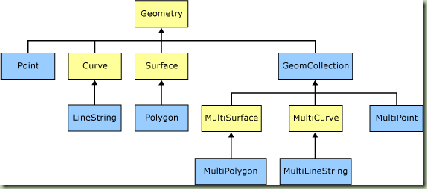
geometry diagram

See SQL Server 2008 BOL for more detailed information.
Finally, let's take a peek at this in action:

-- Make a table to use that holds geography data type
CREATE TABLE SpatialTable 
    ( id int IDENTITY (1,1),
    GeogCol1 geography, 
    GeogCol2 AS GeogCol1.STAsText() );
GO
-- Put some data into the table to use
-- Notice the use of the STGeomFromText 
-- instance method.
INSERT INTO SpatialTable (GeogCol1)
VALUES (geography::STGeomFromText('LINESTRING(47.656 -122.360, 47.656 -122.343)', 4326));
INSERT INTO SpatialTable (GeogCol1)
VALUES (geography::STGeomFromText('POLYGON((47.653 -122.358, 47.649 -122.348, 47.658 -122.348, 47.658 -122.358, 47.653 -122.358))', 4326));
GO
-- Make some variables
DECLARE @geog1 geography;
DECLARE @geog2 geography;
DECLARE @result geography;
-- Put some data in the variables from the table,
-- notice the use of built in methods/properties
-- of the data type "STAsTex()"
SELECT @geog1 = GeogCol1 FROM SpatialTable WHERE id = 1;
SELECT @geog2 = GeogCol1 FROM SpatialTable WHERE id = 2;
SELECT @result = @geog1.STIntersection(@geog2);
SELECT @result.STAsText();
Output:
------------------------------------------------------------------------------------------
LINESTRING (47.656000260658459 -122.3479999999668, 47.656000130309728 -122.35799999998773)
(1 row(s) affected)
-- Quick example of using the POINT instance
DECLARE @g geometry;
SET @g = geometry::STGeomFromText('POINT (3 4)', 0);
SELECT @g
Output:
------------------------------------------------------------------------------------------
0x00000000010C00000000000008400000000000001040
(1 row(s) affected)


Well, that brings us to the end of another post. I hope you gained something useful from it. I will try really hard to make sure there is a post tomorrow, though I have late meetings this evening so the next entry may be on Thursday. Until then, see you later.

Friday, July 11, 2008

Hierarchy made easier

Well, we are on a roll now, three days in a row! Today let's examine some new data types that have been added to SQL Server 2008.

SQL Server 2008 offers several new data types. One of the more interesting is the HierarchyID type. The HierarchyID data type is implemented as a CLR UDT (User defined type) and is exposed to CLR clients as SqlHierarchyId. The HierarchyID type will allow you to model organization structures, tree structures and hierarchies.
This new data type comes with many built-in methods that will allow you to manipulate and edit hierarchical data.
The methods exposed by the HierarchyID are:

child.GetAncestor(n) - this returns the HierarchyID of the nth ancestor
parent.GetDescendant(child1, child2) - this returns a child node
node.GetLevel() - returns an integer value of the depth of the node in the structure
hierarchyid::GetRoot() - returns the root of the structure
parent.IsDescendant(child) - determines if a node is a descendant of another node
hierarchyid::Parse(string) - converts a string representation of a hierarchyid into a hierarchyid value
void Read(BinaryReader x) - for CLR clients, reads a binary representation of a SqlHierarchyId object from the BinaryReader parameter and sets the SqlHierarchyId object to that value
node.Reparent(OldRoot, NewRoot) - move a node in the hierarchy from one parent to another
node.ToString() - returns a string with a logical representation of the node
void Write(BinaryWriter x) - for CLR clients, writes a binary representation of a SqlHierarchyId object to the BinaryWriter parameter.

You can use any of the above methods that return a node (representation of the hierarchy) in place of HierarchyID data type.

Let's look at how the HierarchyID works (as seen on Ravi Maniam's blog (http://blogs.msdn.com/manisblog/archive/2007/08/17/sql-server-2008-hierarchyid.aspx);

Use AdventureWorks
Go  
--Create Scheme
Create Schema HumanResources 
Go  
--Create Table  
CREATE TABLE HumanResources.EmployeeDemo 
( 
OrgNode HIERARCHYID, 
EmployeeID INT, 
LoginID VARCHAR(100), 
Title VARCHAR(200), 
HireDate DATETIME 
) 
Go 
--Create Index
CREATE UNIQUE CLUSTERED INDEX idxEmployeeDemo 
ON HumanResources.EmployeeDemo (OrgNode,EmployeeID) 

--Insert First Row       
INSERT HumanResources.EmployeeDemo (OrgNode, EmployeeID, LoginID, Title, HireDate)              
VALUES (hierarchyid.GetRoot(), 1,'adventure-works\scott', 'CEO', '3/11/05') ; 
Go           
--Insert Second Row      
DECLARE @Manager hierarchyid            
SELECT @Manager = hierarchyid.GetRoot() FROM HumanResources.EmployeeDemo; 
INSERT HumanResources.EmployeeDemo (OrgNode, EmployeeID, LoginID, Title, HireDate)              
VALUES (@Manager.GetDescendant(NULL,NULL), 2, 'adventure-works\Mark',            
'CTO', '4/05/07')         
Go 
--Insert Third Row
DECLARE @Manager hierarchyid            
DECLARE @FirstChild hierarchyid         
SELECT @Manager = hierarchyid.GetRoot() FROM HumanResources.EmployeeDemo; 
Select @FirstChild = @Manager.GetDescendant(NULL,NULL)              
INSERT HumanResources.EmployeeDemo (OrgNode, EmployeeID, LoginID, Title, HireDate)              
VALUES (@Manager.GetDescendant(@FirstChild,NULL), 3, 'adventure-works\ravi',            
'Director Marketing', '4/08/07')        
Go           
--Insert the First Descendant of a Child Node         
DECLARE @Manager hierarchyid            
SELECT @Manager = CAST('/1/' AS hierarchyid)          
INSERT HumanResources.EmployeeDemo (OrgNode, EmployeeID, LoginID, Title, HireDate)              
VALUES (@Manager.GetDescendant(NULL, NULL),45,        
'adventure-works\Ben','Application Developer', '6/11/07') ;         
Go           
--Insert the Second Descendant of a Child Node        
DECLARE @Manager hierarchyid            
DECLARE @FirstChild hierarchyid         
SELECT @Manager = CAST('/1/' AS hierarchyid)          
SELECT @FirstChild = @Manager.GetDescendant(NULL,NULL)              
INSERT HumanResources.EmployeeDemo (OrgNode, EmployeeID, LoginID, Title, HireDate)              
VALUES (@Manager.GetDescendant(@FirstChild, NULL),55,        
'adventure-works\Laura','Trainee Developer', '6/11/07') ;           
Go           
--Insert the first node who is the Descendant of Director Marketing       
DECLARE @Manager hierarchyid            
DECLARE @FirstChild hierarchyid         
SELECT @Manager = CAST('/2/' AS hierarchyid)          
INSERT HumanResources.EmployeeDemo (OrgNode, EmployeeID, LoginID, Title, HireDate)              
VALUES (@Manager.GetDescendant(NULL, NULL),551,              
'adventure-works\frank','Trainee Sales Exec.', '12/11/07') ;        
Go           
--Insert the second node who is the Descendant of Director
--Marketing
DECLARE @Manager hierarchyid DECLARE @FirstChild hierarchyid SELECT @Manager = CAST('/2/' AS hierarchyid) SELECT @FirstChild = @Manager.GetDescendant(NULL,NULL) INSERT HumanResources.EmployeeDemo (OrgNode, EmployeeID, LoginID, Title, HireDate) VALUES (@Manager.GetDescendant(@FirstChild, NULL),531, 'adventure-works\vijay','Manager Industrial Sales', '12/09/06') ; Go --Insert the third node who is the Descendant of Director
-- Marketing
--in between 2 existing descendants DECLARE @Manager hierarchyid DECLARE @FirstChild hierarchyid DECLARE @SecondChild hierarchyid SELECT @Manager = CAST('/2/' AS hierarchyid) SELECT @FirstChild = @Manager.GetDescendant(NULL,NULL) SELECT @SecondChild = @Manager.GetDescendant(@FirstChild,NULL) INSERT HumanResources.EmployeeDemo (OrgNode, EmployeeID, LoginID, Title, HireDate) VALUES (@Manager.GetDescendant(@FirstChild, @SecondChild),543, 'adventure-works\james','Manager Consumer Sales', '12/04/06') ; --Use Serializable Transaction CREATE PROCEDURE AddEmployee(@ManagerID hierarchyid, @EmpID int, @LogID varchar(100), @JobTitle as varchar(200), @JoiningDate datetime) AS BEGIN DECLARE @LastChild hierarchyid SET TRANSACTION ISOLATION LEVEL SERIALIZABLE BEGIN TRANSACTION SELECT @LastChild = Max(OrgNode) From HumanResources.EmployeeDemo WHERE OrgNode = @ManagerID INSERT HumanResources.EmployeeDemo (OrgNode, EmployeeID, LoginID, Title, HireDate) VALUES(@LastChild, @EmpID,@LogID , @JobTitle, @JoiningDate) COMMIT END ;
 
Please post any questions in the comments and I'll get back to you quickly. I hope you can find a use for the HierarchyID data type in your day to day work.
Have a good weekend and we'll be back on Monday. Remember to post any suggestions for topics or specific questions. You can also email me at sql.slinger@gmail.com.